

Search Products & Tools

MBOX Converter Software Interface
v1.0Free Trial
30-Day Money Back
24/7 Support
Virus Free

Download Merge PST

Quick merging of Outlook PST files into a single PST with Merge PST Tool

Total Ratings: 823 - Average Rating: 4.8 out of 5
An advanced software to merge PST
Capable to merge both ANSI and Unicode versions' files
Merge only those PST files that users want to
Various options to merge Outlook Files
Merge by allowing you to create new folder for each PST
Create one folder to save the merged data
Merge only inbox, contacts or required folders
Capacity to scan PST files created in any version of Outlook including 2003 to 2016
A purely Windows based app, supports all the latest versions of the OS including Wins 8/10/XP/Vista

GainTools Merge PST Software

Offer custom merge support to all sizes Outlook files

Easy to Operate

This is a Windows operating app, needs less technical help to operate. The wizard of the program is fairly simple to understand as each features are described their role. The utility installs and configure easily.

Support Multiple Merge Options

Not just one but also multiple merge PST options are supported by the app to find the best results. Choose any of your desirable merge options to find desirable results. Merge either entire data or just the required folder.

Retain Quality

Quality is not hindered whether you choose to merge 2, 3, 4 or more PST files together. A strong PST file can be created by merging small sized PST files. It helps to avoid file clutter.

PST Merge App Benefits & Features


no file size limit

Merge PST at Fast Speed & with Accuracy

When it comes to merge manually, you may take a lot of time but this third app performs the task so fast. It saves your time and effort. The converted data is saved with full accuracy by retaining all mail properties, contacts and other details. No file is missed and corrupted. It has been tested for accuracy.

no file size limit

A Highly Compatible App

In terms of compatibility, the tool has no comparison with other merged PST tools. It merges PST files saved in both ANSI and Unicode versions. Moreover, the utility scans and merges PST files saved in Outlook 2003/2007/2010/2013/2016. All versions are supported. It runs swiftly on all the latest versions of Windows.

no file size limit

Merge Entire PST files in One or Separate Folders

There are two options to choose. You can either create one folder to save the merged data or can create new folder for each PST. Use any of these options to find merge operation successful. The utility works with full accuracy in all these options.

no file size limit

Save Merged Data Locally

All the resultant data is saved locally. The output location is decided by users only. The newly created PST file can be saved to any existed folder that you have chosen or you can create a new folder to save data. Thus, smart and safe data merge process is supported. No file is mismanaged.

no file size limit

Merge Required PST Files Only

The control of merge process is at user’s hands. At first, the utility needs you to browse and select the PST files from local folders which you want to merge. You are free to select 2, 3, 4 or more PST files together. The tool helps to reset the file selection. No data loss, maintain all the metadata emails, contacts, calendar, etc.

no file size limit

Supports ANSI & Unicode PST

This GainTools Merge PST software supports both types of PST files, ANSI and Unicode. The ANSI format was created by the Old version of Outlook, and the latest version creates a Unicode format. Both formats are different and tricky to merge, but no need to worry because this tool merges old ANSI PST and Unicode PST files easily and creates a single PST file.

How to combine various PST files into a single PST file?

With GainTools Merge PST Software, the process of merging Outlook PST files becomes simple. Get the step by step working of this tool.

+

The very first step is to download, install and launch the software on your system.
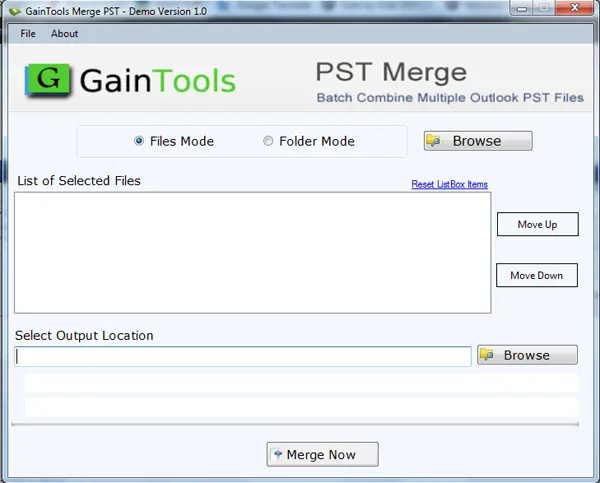
download merge pst software
+

Select File or Folder mode and then Browse Outlook PST files from your system to the software panel. You can move the loaded PST files up and down through ‘Move Up’ and ‘Move Down’ buttons.
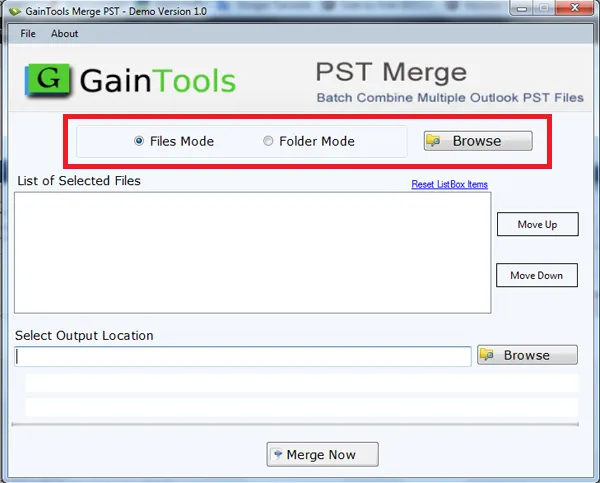
browse outlook pst files
+

Click the Browse button and select a path of your system to save the resultant PST file.
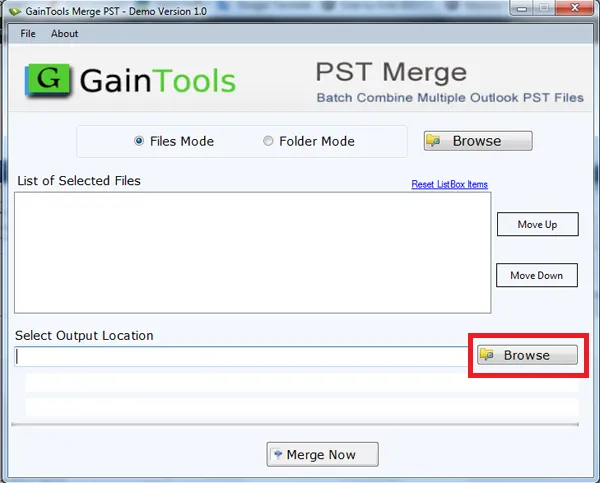
choose output location
+

Finally, hit the Merge Now button to start the process of combining PST files. It takes only a few minutes to provide results.
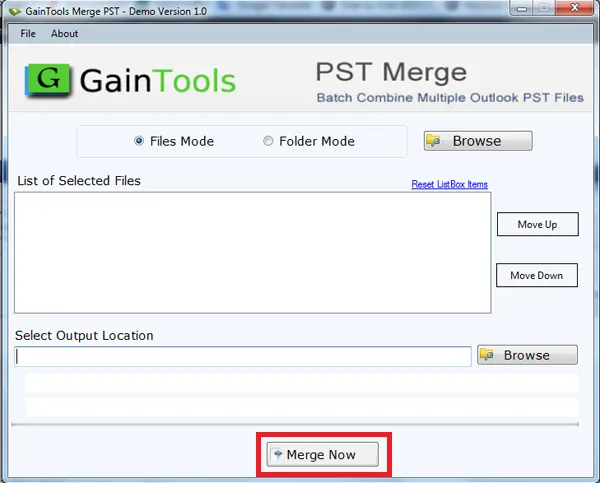

click merge now button

Merge PST App FAQs

+

No, you cannot as it scans and merges only healthy PST files.

+

Yes, there is no restriction.

+

Use the tool to merge PST files as many times as you wish.

+

Yes you can merge. The tool only recognizes the PST files to merge. It doesn’t matter in which Outlook version it has been created.

+

Yes, you are allowed to merge any folder be it contacts, inbox, outbox etc…

Merge PST Process Images

Step-by-step visual guide to Merge PST files

How to Use Merge PST Tool Software

Watch our comprehensive tutorial to learn how to Merge PST files in just a few simple steps

MBOX Converter Tutorial Video

Watch Tutorial

Learn how to Merge PST files step by step

Video Tutorial

Step-by-Step Guide

Complete walkthrough of the conversion process

Easy to Follow

Simple instructions for all skill levels

Quick Results

See how fast the conversion process is

Merge PST Tool Free Download

Software Name
GainTools Merge PST Software
Version
1.0
File Size
2.14 MB
Operating System
Windows 11/10/8.1/8/7 (64-bit & 32-bit)
Download a Trial

Take the tool to evaluate by Merging 10 emails from each Merge PST folder.

Compatibility & Format

Input Formats
Multiple PST
Output Formats
PST
License
TRIAL + FULL
Language
English

System Requirements

Processor
1 GHz or faster
RAM
Minimum 512 MB
Hard Disk
100 MB free space
Display
1024x768 resolution

Client’s Views about Merge PST Tool

See what our satisfied customers have to say about their experience with our Merge PST tool

"Having this fabulous application, joining several PST files into one PST file becomes so easy for me. I have combined Outlook 2013 PST files in a single PST with Merge PST Software in a simplified manner without affecting the original files."

JL

Jessica Lauren

"Manual merging of Outlook PST files is really a cumbersome task but having Merge PST Software, the joining process becomes so simple without any trouble. I came to know this when I came in contact with your tool."

LM

Lily Michelle

"When I upgraded from Outlook 2010 to 2019, I wanted to merge the previous Outlook files with new Outlook PST but I was not getting a feasible solution. After a lot of hard work, I got Merge PST software by GainTools. This software has solved my problem."

DK

Sophie Tracy